
4 High-Demand Digital Productivity Planners Your Customers Want Now!
The digital productivity planner space on Etsy is growing fast, and this week’s data shows exactly where the interesting gaps still exist. We’ve identified four digital planners across Notion and Google Sheets, each occupying a unique market position. For sellers willing to dig deeper, these products offer distinct strategic advantages that the raw data might miss.
Trend Insights: Digital Productivity Planners
- The Eisenhower Matrix actually has more monthly searches than sellers (1,003 to 985), making it an undersupplied gap in the digital productivity planner category.
- Buyers seeking an ADHD Notion Template drove a 145% click-through rate, reflecting a high-intent audience that compares several systems before purchasing.
- Subscription Tracker demand is flat for most of the year but spikes in Q4, creating a high-pressure buying window for prepared sellers.
- Even with 5,500 sellers competing for 500 searches, the Excel Calendar’s multi-peak trend allows listings with consistent SEO to outperform the competition throughout the year.
Digital Productivity Planners That Serve Real Workflows
The most durable digital productivity planner products on Etsy solve a workflow problem that the buyer has already identified and named.
A person searching for an Eisenhower Matrix digital productivity planner has read about the framework and decided to implement it. Someone searching for a Notion Template ADHD has spent time in Notion, found the blank canvas overwhelming, and is looking for a structure that accounts for how their attention actually works.
That specificity of intent is what separates the products in this week’s lineup from generic planners, and it’s why the click-through rates across all four are so high. Buyers who know exactly what they want convert far more efficiently than those still exploring.
Tuesday Trends
Every Tuesday, I share trending digital product ideas, keywords, and examples based on what people are actively searching for right now. These ideas are perfect for:
- Etsy digital product sellers who want to grow their product catalog
- PLR shop owners looking for new, in-demand content
- Digital product creators building income with printables, planners, or templates
These aren’t random suggestions – they’re backed by real Etsy data, buyer behavior, and current trends.
Trending Now — Notion Template ADHD
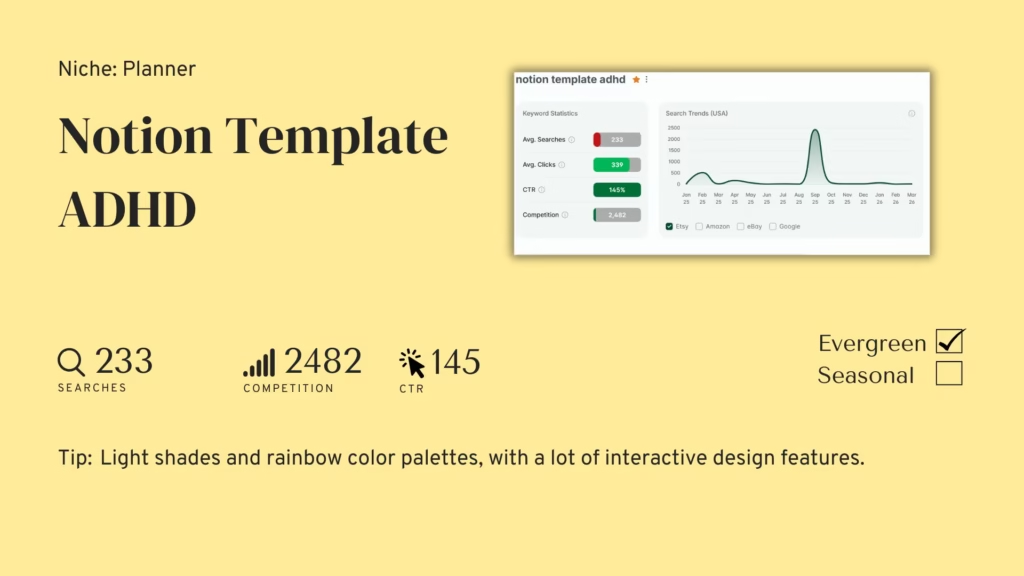
Competition: 2,482 listings | Avg Searches: 233 | Avg CTR: 145%
A Notion Template ADHD is a pre-built workspace designed specifically for users with ADHD, structured to reduce decision fatigue, minimize overwhelm, and support the kind of flexible, non-linear task management that works better for ADHD brains than a standard to-do list.
The buyer has typically already tried generic Notion templates, found them too rigid or too visually plain to stay engaged with, and is now looking for something built with their specific cognitive style in mind. This is one of the few digital productivity planner products where the design itself is part of the therapeutic value, and buyers evaluate it accordingly.
➡️ Competition: 2,482 sellers is low, and given the specificity of the search term, that number represents far less effective competition than it appears. A generic productivity template seller and an ADHD-specific template seller are not really competing for the same buyer. Sellers who build explicitly for this audience face a much thinner field than the raw count suggests.
➡️ Average Searches: 233 monthly searches with a sharp spike visible in the trend graph around September, which aligns with back-to-school and new-academic-year productivity resets. The evergreen baseline holds through the rest of the year, but the September peak is worth preparing for specifically. A listing with established reviews heading into August is in a significantly stronger position than one launched in September itself.
➡️ Click-through Rate: 145% is the standout figure in this week’s edition. Buyers searching for an ADHD Notion template open multiple listings and evaluate carefully before purchasing, because the stakes feel personal. A template that doesn’t match how they think won’t get used, and they’ve probably learned that from experience. Your listing needs to demonstrate the system in action, not just show what it looks like empty.
Trending Now — Eisenhower Matrix
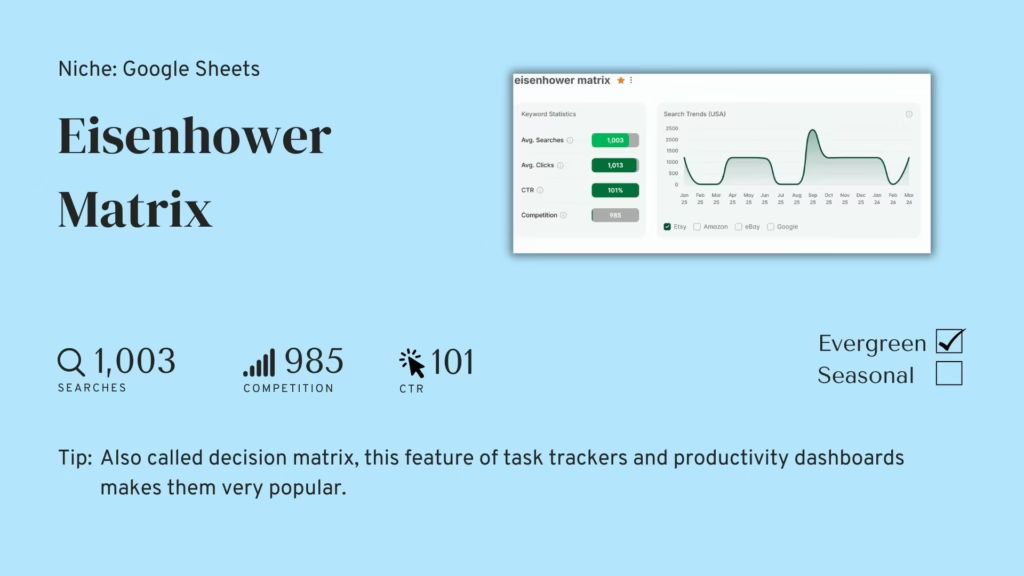
Competition: 985 listings | Avg Searches: 1,003 | Avg CTR: 101%
An Eisenhower Matrix is a priority-sorting framework and a strong digital productivity planner product in its own right that divides tasks into four quadrants based on urgency and importance, helping users decide what to do now, schedule, delegate, or drop entirely. As a Google Sheets product, it typically functions as either a standalone decision-making tool or as a featured module inside a larger productivity dashboard. The buyer has usually encountered the framework in a productivity book or article, decided to try it, and is searching for a ready-built version rather than recreating the grid from scratch.
➡️ Competition: 985 sellers puts this inside very-low-competition territory, and that figure is striking against four-figure monthly search volume. Most productivity frameworks this well-known and widely taught have accumulated far more Etsy competition. The gap exists partly because the Eisenhower Matrix is often bundled inside larger templates rather than sold as a standalone product, which means the standalone search term is genuinely underserved.
➡️ Average Searches: 1,003 searches a month with a trend graph that shows two substantial annual peaks and a floor that never drops to zero. This is one of the most commercially stable products in today’s lineup. The consistent baseline means income isn’t dependent on catching a single seasonal window, while the peaks provide predictable traffic boosts that reward sellers who refresh their listings ahead of each one.
➡️ Click-through Rate: 101% in a very-low-competition market tells you that buyers are opening more than one listing on average, even with fewer than a thousand sellers to choose from. In a thin market, that behavior points to buyers who have a clear quality bar in mind and are checking whether any of the available options clear it. A well-built, visually confident listing in a field of mostly sparse alternatives will earn a disproportionate share of those purchases.
Trending Now — Excel Calendar
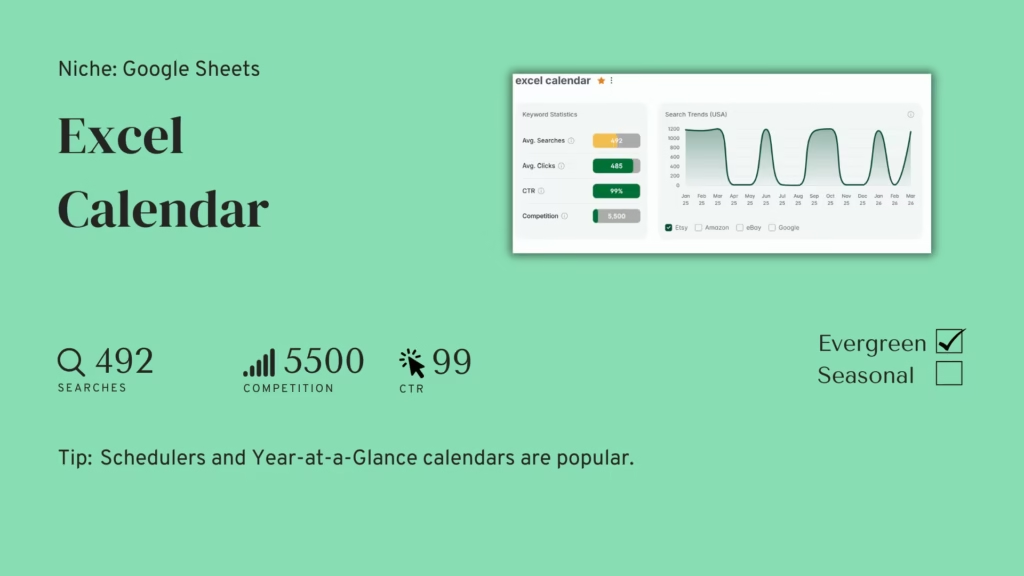
Competition: 5,500 listings | Avg Searches: 492 | Avg CTR: 99%
An Excel calendar template is a popular digital productivity planner built inside spreadsheet software that buyers use for scheduling, project planning, content management, or year-at-a-glance annual tracking. Despite being categorized under Google Sheets on Etsy, buyers searching “Excel calendar” are typically comfortable in spreadsheet software and want something functional over decorative. The visual design still matters for the purchase decision, but the template needs to hold up under actual use. A calendar that looks good but breaks when you add real data won’t earn positive reviews.
➡️ Competition: 5,500 sellers sits at the upper end of moderate. The realistic competitive set is smaller than that figure implies, because the category spans wildly different use cases. A content calendar for a social media manager and a year-at-a-glance personal planner share a search term but serve completely different buyers. Choosing one use case and building the best version of it is more commercially effective than trying to cover all of them in a single product.
➡️ Average Searches: 492 monthly searches, and the trend graph is one of the more interesting in this edition. Rather than a single annual spike, demand shows four or five recurring peaks throughout the year, each corresponding to a different planning cycle: new year, end of Q1, mid-year, back-to-school, and Q4 planning season. An Excel calendar listing that stays visible and optimized across all of those moments compounds its returns significantly compared to one that relies on a single peak.
➡️ Click-through Rate: 99% means almost every search leads to a click, which in a moderate-competition market tells you buyers are finding enough viable options to choose from without abandoning the search. The conversion challenge here is standing out on a results page where most listings look competent. A thumbnail that leads with the calendar’s most distinctive feature, such as its Year-at-a-Glance view or its color-coded scheduling logic, gives buyers a reason to click yours over the functionally similar alternatives beside it.
Trending Now — Subscription Tracker
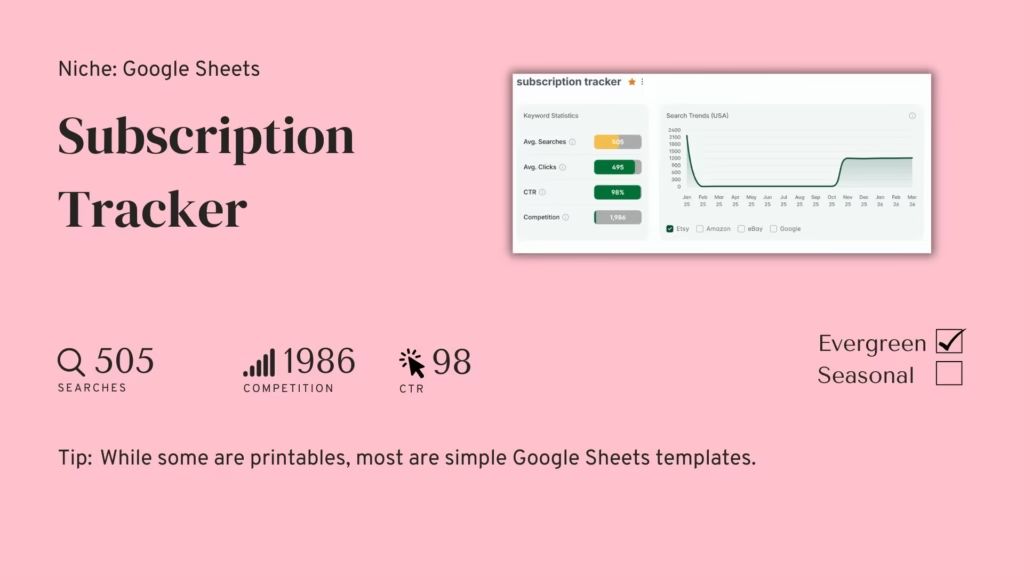
Competition: 1,986 listings | Avg Searches: 505 | Avg CTR: 98%
A subscription tracker is a Google Sheets digital productivity planner that helps users log, categorize, and monitor all their recurring subscriptions in one place, calculating monthly and annual totals so they can see exactly what they’re spending and identify what to cancel. The buyer has usually just received a credit card statement that surprised them, or has been meaning to audit their subscriptions for months and finally decided to act on it. It’s a product that solves a concrete financial pain point with a format that most buyers already know how to use.
➡️ Competition: 1,986 sellers is low, and the Google Sheets format dominates the category. A seller entering the digital productivity planner space with a well-designed spreadsheet template is competing in a field that skews toward printables and simpler layouts. A template that auto-calculates totals, flags upcoming renewal dates, and color-codes by category type offers a clear functional advantage over most of what’s currently available.
➡️ Average Searches: 505 monthly searches on average, but the trend graph tells the more important story here. Demand was relatively flat for most of the year before climbing sharply in Q4, with the spike sustaining through year-end. That pattern almost certainly reflects the subscription audit behavior that accompanies new year financial resets, when people review what they’re spending as part of broader money management goals. The annual average undersells what a well-timed Q4 push can achieve.
➡️ Click-through Rate: 98% across an evergreen product with a strong Q4 spike indicates buyers are consistent and specific in what they’re looking for. This isn’t a product where buyers arrive uncertain about the format or the use case. They know they want a tracker, they know they want it in Google Sheets, and they’re selecting based on which listing looks the most complete and trustworthy. A listing that prominently shows a populated tracker with real-looking subscription categories converts those searches more efficiently than one that shows an empty template.
Why add Digital Productivity Planners to your shop?
This week’s four digital productivity planner products cover a useful range of entry points for sellers in the spreadsheet and Notion space.
The Eisenhower Matrix is the most immediately actionable: very low competition, over 1,000 monthly searches, and a standalone product that most sellers have left unbuilt. The Notion Template ADHD is a digital productivity planner that rewards sellers who approach it with genuine design thoughtfulness rather than surface-level accessibility claims. The Subscription Tracker has a Q4 demand surge that behaves seasonally inside an evergreen classification, making early preparation disproportionately valuable. And the Excel Calendar compounds returns for sellers who treat it as a living listing rather than a one-time build.
The common thread is specificity. Each of these digital productivity planner products serves a buyer who has already done the thinking about what they need. Your job is to build something that meets that expectation clearly and completely.
Discover Trending Etsy Products Every Week!
✨ Every week, right in your inbox: get trend-backed product ideas with matching templates you can sell in minutes.
Join Tuesday Trends, and each week you’ll get:
- Real product trends based on Etsy data
- Keywords, angles, and insights that help your listings convert
- A plug-and-play PLR template to save hours on creation
These aren’t just ideas – they’re starting points for your next listing, bundle, or shop update.
👉 Start listing products your buyers are already searching for.
❓Frequently Asked Questions – Digital Productivity Planners
What types of digital productivity planner are customers looking for on Etsy?
Buyers searching for a digital productivity planner on Etsy have usually already decided on the format they want. Across every type of digital productivity planner, the sale happens when your listing speaks directly to that already-formed intent. They’re not browsing to discover that Notion templates or Google Sheets trackers exist. They’ve landed on a system they believe will work for them, and they’re looking for a pre-built version that saves them the setup time. The ADHD buyer wants a system that accommodates how their attention actually functions. The Eisenhower Matrix buyer wants to implement a prioritization framework they’ve read about. The subscription tracker buyer wants to see exactly what their recurring costs are adding up to. In each case, the sale happens when your listing communicates “this was built for exactly your situation” more convincingly than the alternatives on the same page.
Do Google Sheets digital productivity planner templates sell well compared to Notion templates?
Both are strong digital productivity planner formats, but they serve meaningfully different buyers. Google Sheets buyers tend to prioritize accessibility and simplicity. They want something that works on any device without installing software, that a non-technical person can pick up in five minutes, and that produces reliable outputs without needing to understand a complex system. Notion buyers are typically already invested in the platform and looking for a template that extends and organizes a workspace they’ve already committed to. Neither is a more lucrative market than the other, but the design requirements and buyer expectations are different enough that building for both simultaneously often produces products that satisfy neither particularly well.
Is the ADHD productivity planner niche appropriate for sellers without personal experience of ADHD?
It’s possible to build a good product in this space without personal experience, but it requires genuine research into how ADHD affects task management, focus, and planning. Buyers in this category are experienced enough with their own needs to recognize templates built on secondhand assumptions quickly. The listings that perform best in this space tend to come from creators who have either lived experience or have engaged deeply with ADHD productivity communities. If you’re approaching it from the outside, spending time in ADHD forums and productivity communities before building will significantly improve the quality and relevance of what you create.
When is the best time to launch a subscription tracker listing?
The subscription tracker’s demand curve points strongly toward Q4, which means a listing launched in October is in the best position to capture the year-end financial review surge. Launching in October gives the listing six to eight weeks to accumulate initial views, favorites, and potentially a first purchase or two before the peak arrives. A listing that enters November with even a small review base outperforms a cold launch in late November or December. If you miss the Q4 window, the next best moment is January, when new year financial goals drive a secondary wave of interest in tools for tracking and reducing recurring expenses.
How do I make a digital productivity planner stand out in a moderate-competition market like Excel Calendar?
The most effective approach is choosing a use case and building the definitive version of it rather than creating a general-purpose calendar that tries to serve everyone. A content calendar for creators, a project timeline for freelancers, or a Year-at-a-Glance annual planner each occupies its own space within the broader Excel calendar category. Each has its own search terms, its own buyer expectations, and its own design requirements. Competing narrowly against a smaller subset of the 5,500 sellers is a more winnable strategy than competing broadly against all of them at once.
Can these four digital productivity planner products work together as a shop collection?
They sit naturally alongside each other in a productivity-focused shop. A buyer who purchases the Eisenhower Matrix may return for the subscription tracker when they decide to audit their finances. A buyer who finds the ADHD Notion template may look at the rest of your shop for complementary tools. The sellers building the most durable catalogs in the digital productivity planner space think in terms of buyer journeys rather than individual products. Each listing is an entry point into a shop, and a shop where the products clearly belong together gives buyers more reasons to stay, explore, and purchase again.
What format works best for a digital productivity planner on Etsy: printable, Google Sheets, or Notion?
It depends entirely on the digital productivity planner product and the buyer. Printable planners work well for buyers who prefer analog tracking or want something to display physically. Google Sheets templates suit buyers who want flexibility, shareability, and automatic calculations without committing to a new platform. Notion templates serve buyers who have already built their workflow inside Notion and want to extend it rather than switch tools. For products like the subscription tracker and Eisenhower Matrix, Google Sheets is the dominant format because the functional requirements, such as formulas and automatic calculations, are what make the product valuable. For the ADHD planner, Notion’s visual flexibility and toggle features make it a better fit for the specific design needs of that buyer.
⚡Spread the Word
Thank you for reading this edition of Tuesday Trends!
If you found this valuable, please share it with other sellers who’d like to grow their printables shop, whether on Etsy or elsewhere.
Additional resources to grow your Etsy shop:
- New to Etsy? Click here to get your first 40 listings for FREE.
- Trending PLR templates with resell rights
- Start selling on Etsy with this free guide.
- Create your own digital products to sell
- Brand your printables with these free mockup templates
- Speed up your Etsy listings
- Grow your Etsy shop faster – and make more per sale!
- Use this tool to find trending products with low competition
- Learn how to how to capitalize on seasonal trends for digital products
- Book a free call with Dylan Jarhaus, a six figure Etsy Seller
