
3 Must-Have Editable Magazine Templates With Specific Demand Windows
People don’t stumble into editable magazine templates by accident. Buyers searching for these products already have a project in mind and a finished result they can picture clearly — what they’re missing is the design skill to make that vision real, and a well-built template gives them exactly that.
This week’s three products span three distinct occasions: weddings, family holiday keepsakes, and personal Canva projects like birthday tributes and newsletters. Each one draws a buyer who wants the finished piece to look like a real publication, not a homemade project. The data below shows where the competition sits, when demand peaks, and which of these three products offers the clearest opening for a new listing right now.
Trend Insights: Editable Magazine Templates
- Wedding Magazine has only 3,943 competing sellers for a keyword that generates consistent year-round demand, making it the most favorable competition-to-search ratio among the editable magazine templates in this roundup.
- Canva Magazine Template is the highest-competition product here at 7,524 sellers, but the dual-peak trend graph reveals two distinct buying windows per year rather than one.
- Family Memory Book is the only seasonal product in this set, with a sharp December spike that maps directly onto holiday gifting and year-end family projects.
- All three editable magazine templates carry click-to-search ratios above 95%, pointing to categories with strong and sustained engagement relative to their search volumes.
- Two of the three products are evergreen, which means a well-optimised listing can generate returns across the full calendar year.
What Editable Magazine Templates Have in Common Across These Three Niches
All five numbers point to one thing: the buyer across all three products this week is working on something they want to look impressive. A couple creating a Wedding Magazine for their reception wants guests to pick it up and feel the care that went into the event. A family commissioning a Family Memory Book wants pages that look like a real publication, not a scrapbook assembled in a hurry. A creator purchasing a Canva Magazine Template has a project in mind — probably a birthday tribute or a family newsletter — and wants a starting point that already reads as polished.
In each case, the editable magazine template is the gap between the vision the buyer already has and the design skills they don’t. That’s what drives buyers to search, and what a well-designed listing solves for them.
Tuesday Trends
Every Tuesday, I share trending digital product ideas, keywords, and examples based on what people are actively searching for right now. These ideas are perfect for:
- Etsy digital product sellers who want to grow their product catalog
- PLR shop owners looking for new, in-demand content
- Digital product creators building income with printables, planners, or templates
These aren’t random suggestions – they’re backed by real Etsy data, buyer behavior, and current trends.
Trending Now — Canva Magazine Template
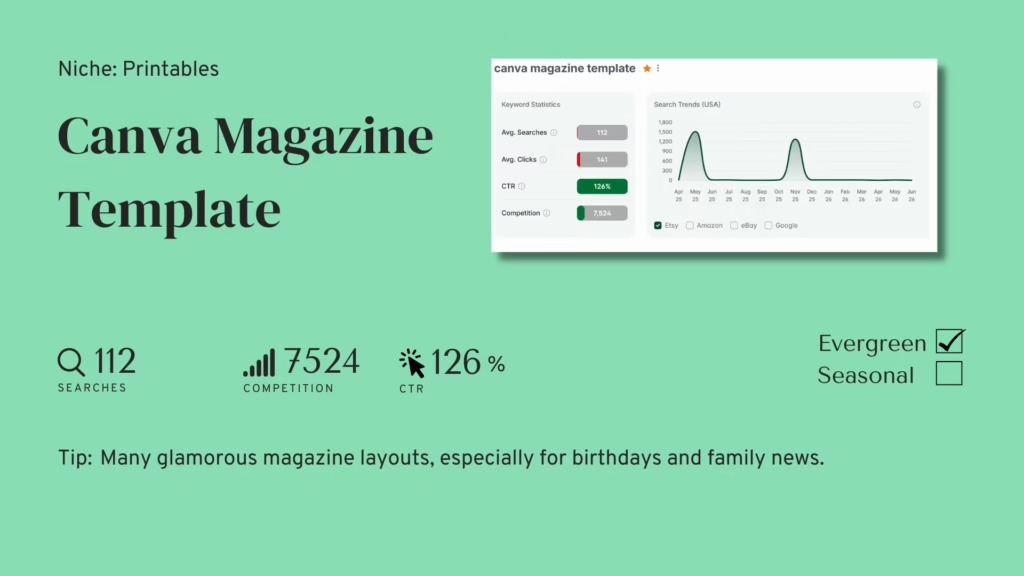
Competition: 7,524 listings | Avg Searches: 112 | Avg CTR: 126%
A Canva Magazine Template is a multi-page, fully editable layout built in Canva. Buyers use it to create their own magazine-style publications. Common use cases: a milestone birthday tribute magazine, a family holiday newsletter, or a personal project mixing photos with designed layouts. The buyer picks Canva because they already know the platform. They want a template that elevates what they can produce on their own — the same instinct behind demand for celebration templates more broadly.
➡️ Competition: At 7,524 sellers, this is the highest-competition product in this week’s roundup, so it takes more to stand out. The good news: buyers use this template for all kinds of things, so if you pick one occasion — birthdays, newsletters, whatever — you stand out without needing a whole new keyword.
➡️ Average Searches: 112 searches a month on average, but buyers actually search in two separate spikes each year, not one. That gives you two windows to time a listing around instead of one shot to get right.
➡️ Click-through Rate: Buyers click more often than the raw search count shows — 126%, and that’s a good sign. Don’t let the modest 112-search average fool you: they’re circling back and searching related terms, so your real reach here is bigger than the number suggests.
Trending Now — Wedding Magazine
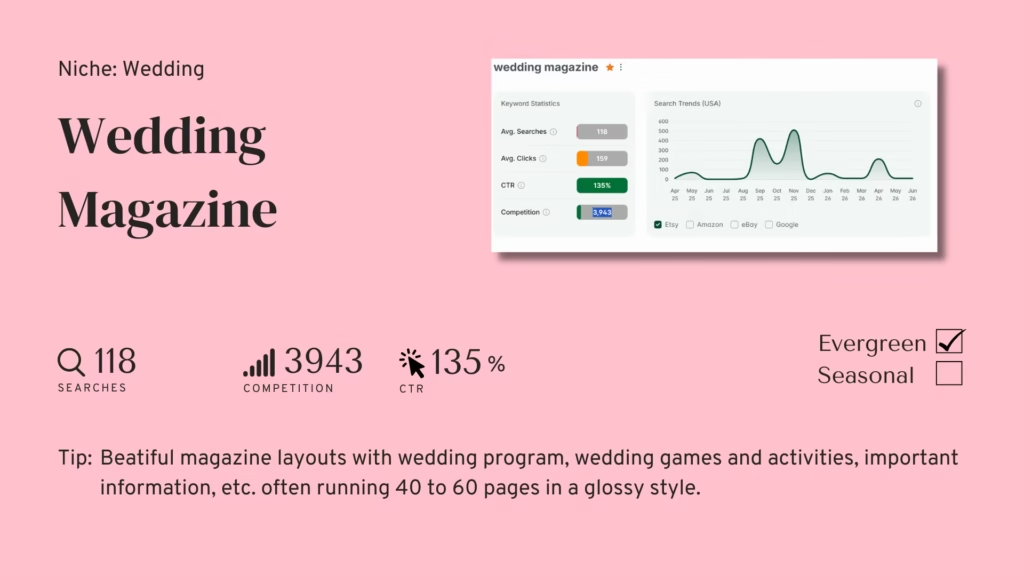
Competition: 3,943 listings | Avg Searches: 118 | Avg CTR: 135%
A Wedding Magazine is a multi-page Canva or printable document. Couples hand it out to guests at their reception, instead of a traditional order-of-service card, or alongside one. At 40 to 60 pages, it usually includes the wedding program and games for guests. It also has information about the couple, plus personal touches like a photo timeline or a message from them. The buyer is a bride or wedding coordinator who’s seen this format at another event or on social media. They’ve decided it sets the tone they want — the same reason couples pay for polish they can’t produce themselves across wedding digital products generally.
➡️ Competition: Wedding Magazine only has 3,943 competing sellers — well below the Canva Magazine Template keyword, even though the two products are close cousins. That’s the payoff of getting specific: you compete in a smaller, easier pool instead of the whole broader category.
➡️ Average Searches: 118 searches a month, and buyers keep searching for this steadily all year, with extra lifts during wedding planning season. Since it’s evergreen, a listing you publish today keeps earning traffic long after you hit publish.
➡️ Click-through Rate: Brides and coordinators click far more than they search — 135%, because they take their time comparing options before buying a 40-to-60 page product. This isn’t an impulse buy: don’t expect instant sales, invest in preview images strong enough to win that side-by-side comparison.
Trending Now — Family Memory Book
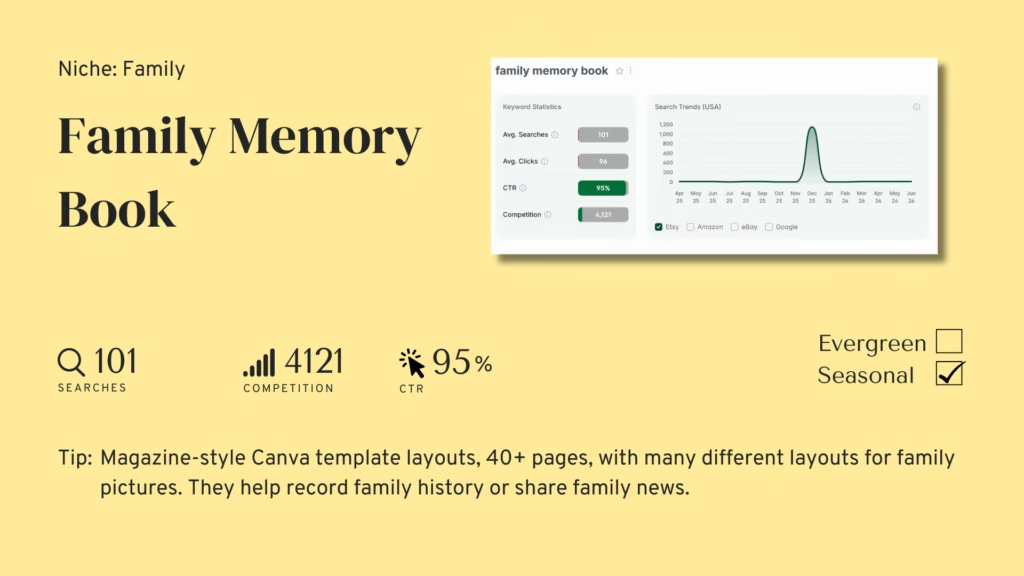
Competition: 4,121 listings | Avg Searches: 101 | Avg CTR: 95%
A Family Memory Book is a magazine-style Canva template. Families use it to document their history, share news, or keep a record of one year. At 40 or more pages, it usually has photo pages, family story sections, and dividers. That gives it a publication feel instead of an album feel. The buyer is usually someone in the family who volunteered — or got nominated — to make the annual document. Often it’s a parent, a grandparent, or a grown sibling. They want it to look impressive at the holiday gathering.
➡️ Competition: Family Memory Book only has 4,121 competing sellers — as low as Wedding Magazine. Same reason: get specific with “family memory book” and you pull in one clear type of buyer instead of competing against the whole Canva template market.
➡️ Average Searches: 101 searches a month on average, but buyers concentrate nearly all their searching into one sharp December spike. They’re shopping for this in the weeks right before the holiday gathering, so get your listing live well before December, not during it.
➡️ Click-through Rate: Clicks and searches land nearly even here — 95%. Buyers here aren’t browsing around: once they find a listing that fits, they click. So don’t worry about winning a long comparison — worry about ranking well enough that buyers find you when they search in December.
Editable Magazine Templates: Where the Opportunity Is Clearest
Wedding Magazine is the easiest entry point of the three. Competition is low, buyers keep searching for it steadily all year, and most sellers won’t bother designing 40 to 60 polished pages — so if you will, you’ve got a more open field than the numbers alone show.
Family Memory Book is the most time-sensitive of the three. December is coming, and if you want to catch that spike, your listing needs to be live and indexed well before it arrives.
Canva Magazine Template is the most flexible of the three. It’s evergreen, with two peaks a year. But competition is moderate, so go specific. A birthday magazine or a holiday family newsletter will outperform a generic template that tries to serve every use case.
Across all three, sellers who treat page count and visual quality as the differentiator win, because buyers can see the difference between a minimal listing and a genuinely impressive one the moment they open the preview.
Discover Trending Etsy Products Every Week!
✨ Every week, right in your inbox: get trend-backed product ideas with matching templates you can sell in minutes.
Join Tuesday Trends, and each week you’ll get:
- Real product trends based on Etsy data
- Keywords, angles, and insights that help your listings convert
- A plug-and-play PLR template to save hours on creation
These aren’t just ideas – they’re starting points for your next listing, bundle, or shop update.
👉 Start listing products your buyers are already searching for.
❓Frequently Asked Questions – Editable Magazine Templates
What types of editable magazine templates are customers looking for on Etsy?
Buyers searching for editable magazine templates already know what they want. They’re comparing listings, not exploring ideas. A couple planning their wedding has already picked the magazine format for their reception. Now they’re comparing layouts, page counts, and colors. A family member organizing the holiday gathering document already has a picture in their head. They’re searching for a template that matches it. A Canva user making a birthday tribute has seen this style done well before. They want a professional starting point, not a blank page. In all three cases, buyers are evaluating, not discovering. They want the template that fits their project best — not one that could work for anyone.
When should I publish a Family Memory Book listing to capture the December spike?
Publish in October. That gives your listing eight to ten weeks to get indexed before the December peak hits. In that time, you can pick up early views and maybe a review or two — both help Etsy rank you higher during the busy season. If you publish in mid-November instead, you’ll enter the peak with less than four weeks of history. That’s a weaker starting position, even with a great product. December demand for this keyword is so concentrated that publishing in October instead of November can be the difference between ranking on page one and ranking on page three.
How many pages should an editable magazine template include?
Aim for 40 pages or more — that’s the benchmark across all three products this week, and for good reason. Buyers of a wedding magazine or family memory book want something that feels like a real publication, not a pamphlet. A 10 to 15 page template at the same price will feel thin next to that. Page count is part of how buyers judge value, and they’ll compare it across listings. Canva Magazine Templates for birthdays or personal celebrations can get away with less — 20 to 30 pages, if the design is strong. But for wedding and family products, buyers expect 40-plus.
What file formats work best for editable magazine templates?
Canva is the standard for all three products, and for good reason: buyers can edit text, swap photos, and change colors without any design software. The typical delivery method on Etsy is a Canva template link inside a PDF instruction sheet. It also helps to include a fully designed PDF version alongside the editable link. Some buyers just want to print the template as-is — that’s common for family memory books and some wedding magazine buyers who’d rather skip personalizing it. What you shouldn’t do: deliver the template as a static PDF only. Buyers expect to be able to edit it — that’s the whole point of the product.
How do I differentiate an editable magazine template listing in a competitive field?
Get specific. That’s the most reliable way to stand out. A generic “magazine template” listing competes against the whole field. A “70th birthday magazine template” or “annual family Christmas newsletter template” competes against a much smaller group. It still pulls traffic from the broader keyword, just with less competition. Your preview images matter just as much. Show the template filled in with realistic content: real-looking family photos, believable text, a finished look. That communicates quality far better than a blank template screenshot. Buyers need to see the finished potential before they’ll commit to customizing it themselves.
Can editable magazine templates generate income year-round?
Yes, for two of the three. Canva Magazine Template and Wedding Magazine are both evergreen — they get steady search traffic all twelve months, with natural lifts during wedding and gifting season. Family Memory Book is seasonal. Its traffic concentrates almost entirely into December, with little demand outside that window. If you carry all three, you get the best of both: steady year-round income from the evergreen two, plus a holiday spike from the seasonal one. That combination is more balanced than relying on just one product alone.
⚡Spread the Word
Thank you for reading this edition of Tuesday Trends!
If you found this valuable, please share it with other sellers who’d like to grow their printables shop, whether on Etsy or elsewhere.
Additional resources to grow your Etsy shop:
- New to Etsy? Click here to get your first 40 listings for FREE.
- Trending PLR templates with resell rights
- Start selling on Etsy with this free guide.
- Create your own digital products to sell
- Brand your printables with these free mockup templates
- Speed up your Etsy listings
- Grow your Etsy shop faster – and make more per sale!
- Use this tool to find trending products with low competition
- Learn how to how to capitalize on seasonal trends for digital products
- Book a free call with Dylan Jarhaus, a six figure Etsy Seller
